
Why the Power, Cooling and Physical Systems Behind IT Matter More Than Ever
20 November 2026 • N-able Critical Infrastructure Team • 8 min read
The infrastructure behind AI
Artificial intelligence is moving quickly from boardroom discussion to real business
requirement. Banks, telecom operators and enterprises are adopting AI for fraud detection,
customer service, analytics and automation, and many of these workloads rely on GPU-based computing.
Most of the conversation focuses on models, software and data. Far less attention is given
to the physical environment these systems run in. GPU servers consume significantly more
power and generate far more heat than conventional IT equipment, and many existing
data centers and server rooms were not designed for that level of density.
In Sri Lanka, large-scale GPU deployments are still at an early stage. However, the Critical
Infrastructure team at N-able is seeing a steady rise in requirements for GPU-ready
facilities. This makes now the right time for organizations to assess whether their power,
cooling and resilience strategies can support the workloads they plan to run in the coming
years.
In this article, we look at what critical infrastructure covers, how AI is changing design
requirements, and why securing enough power has become one of the biggest challenges.
What is critical infrastructure?
In a data center, critical infrastructure means the physical systems that keep IT equipment
running, safe, and available. If any one of them fails, it does not matter how good the servers
or software are. The main building blocks are:
■ Power: utility feeds, transformers, generators, automatic transfer switches, UPS
systems, batteries and power distribution down to the rack.
■ Cooling: precision air conditioning, chillers, in-row or rear-door cooling and, more and
more, liquid cooling.
■ Fire safety: early-warning smoke detection and clean-agent fire suppression that
protects equipment as well as people.
n-able.biz 1
■ Physical security: access control, CCTV and secure zoning, anti-drone solutions.
■ Monitoring: DCIM and BMS and Digital Twin systems that show what is happening
across all of the above, in real time.
These systems are designed together. A change in one, such as a jump in rack power,
ripples straight through the others.
How AI is changing the rules
For years, data centers were designed around fairly steady rack loads, often in the range of
a few kilowatts per rack. AI training and inference servers packed with GPUs draw several
times that, and the heat they produce has to go somewhere. Three things change at once.
1. Power density goes up sharply. A single AI rack can draw as much power as several
traditional racks combined. That puts pressure on everything upstream: PDUs, busways, UPS
capacity, generator sizing, and even the utility connection.
2. Air cooling reaches its limits. Moving enough air through a very dense rack becomes
difficult, noisy, and inefficient. This is why direct-to-chip liquid cooling, rear-door heat
exchangers and hybrid air-and-liquid designs are moving from niche to mainstream.
3. Loads become less predictable. AI jobs can ramp up and down quickly. Power and
cooling systems need headroom and controls that can respond, not just a design figure on
paper.
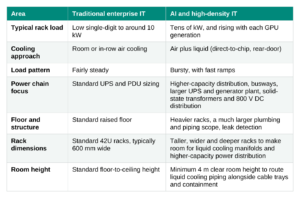
Figures are indicative ranges seen across the industry; actual designs depend on the specific equipment and
workload
The grid challenge: securing enough power
Even the best-designed facility cannot run without enough power at the gate, and this is
now one of the biggest constraints on data center growth worldwide. In many countries, the
utility grid simply cannot deliver the capacity that new data centers require, or cannot
deliver it on the timeline the project needs.
Several major data center markets have placed partial or complete restrictions on new
projects because the grid could not keep up. In some of the world’s largest hubs, utilities
have warned that they cannot meet new data center demand on time, delaying projects by
years. Some energy regulators now go further, requiring new facilities to bring their own
generation or storage capacity to match the power they request.
The lesson is clear: power strategy must be settled at the planning stage, before the
building is designed. Depending on the scale of the facility, the main options are:
■ Smart grid integration with renewable energy. Solar, wind and battery energy
storage, managed through smart grid controls, can supplement the utility supply,
reduce peak demand and support sustainability targets.
■ Agreements with authorities for dedicated supply. For larger facilities, working with
the utility and regulators early to secure power from a remote power plant over
dedicated transmission, and obtaining formal approval for the data center’s power
allocation, avoids costly delays later.
■ Onsite power generation for very high demand. Large AI campuses are increasingly
looking at generating power on site, from gas turbines and fuel cells to, in the longer
term, small modular and micro nuclear reactors. Major cloud providers such as Google
and Amazon have already invested in small reactor technology, although it is still at an
early commercial stage.
Designing for resilience, not just capacity
Adding more power and cooling is only half the journey. The other half is making sure the
facility keeps running when something fails, because eventually something will.
Redundancy that matches the business need. Terms like N+1 and 2N describe how much
spare capacity sits behind each critical system. N+1 means one extra unit beyond what the
load needs; 2N means a complete, independent second path. A bank’s core systems and a
development lab do not need the same level of protection, and paying for 2N everywhere is
rarely the right answer.
Designing to a recognized standard. Frameworks such as the Uptime Institute Tier
classification and ANSI/TIA-942 give owners, designers and contractors a shared language
for availability.
Concurrent maintainability. A well-designed facility lets operators service or maintain any
critical system without affecting the IT load. This matters because maintenance never
stops: UPS batteries, generators and cooling units all need regular servicing for as long as
the facility runs. If each of those jobs requires a shutdown, teams are forced into risky
maintenance windows or tempted to delay the work, and that is when small issues turn into
outages.
n-able.biz 3
Visibility through monitoring. DCIM and BMS platforms bring power, cooling and
environmental data into one view. Combined with the kind of AI-assisted operations
discussed in our earlier blog on AIOps, this helps teams spot a rising temperature trend or a
battery string nearing end of life before it becomes an outage.
Lessons from the field
Across data center and server room projects for banks, enterprises and telecom service
providers in the region, a few lessons stand out.
1. Start with the IT roadmap, not the floor plan. Ask what will run in the space in three to
five years, not just on day one. A room sized only for today’s IT requirement is often full
or overheating long before the building is.
2. Design the power chain end to end. Utility, generator, transfer switch, UPS, distribution
and rack PDUs must be sized as one system. A strong UPS behind a weak distribution
board is still a weak link. However sophisticated the UPS and cooling systems are, the
facility is only as reliable as the overall system architecture behind them.
3. Plan for liquid cooling even if you do not need it yet. Leaving space, structural
capacity and pipe routes for future liquid cooling costs far less than retrofitting a live
facility.
4. Write detailed, system-wise specifications. Clear equipment-level requirements in
the RFP or scope of work make bids comparable and reduce surprises during
installation and testing.
5. Test like it is a real failure. Integrated systems testing, such as pulling utility power and
watching the generators, UPS, and cooling respond together, is the only way to know
the design works as intended.
6. Treat operations as part of the design. Monitoring, maintenance access, spare parts
and trained staff decide how well the facility performs over its life, not just on handover
day.
7. Size battery backup time to the real need. Battery autonomy should be based on how
long the load must ride through until the generators take over, not on the assumption
that more is always safer. Extra backup time is not only additional capex. It also adds
operating cost for the life of the facility, because larger battery banks draw more
power for float charging and need more battery room cooling.
8. Compare Li-ion and VRLA on total cost, not battery price alone. VRLA batteries usually
cost less upfront, while lithium-ion batteries take up far less space, weigh less and last
longer. A fair comparison must include real estate cost, since every square meter given
to a battery room is space that cannot be used for IT, along with structural loading,
cooling and replacement cycles over the life of the facility.
9. Choose the right temperature set points. Power and battery rooms are often cooled
more than they need to be. Raising the set point by just one degree in these rooms can
save around 4% of their annual cooling energy cost, as long as it stays within the
equipment and battery manufacturers’ recommended operating ranges
The bottom line
AI is often described as a software revolution, but it runs on very physical foundations:
copper, cooling water, batteries, generators and well-tested engineering.
Organizations that plan their critical infrastructure with the same care as their digital
strategy will be ready to adopt new technology when they need it. Those that do not
may find that the building, not the budget, becomes the limit.
A U T H O R
N-able Critical Infrastructure Team